Welcome to my HTML learning journey page. Zivacheema.com provides basic yet good information about HTML and CSS, that is helpful for building web pages. Through this platform, you can learn the fundamental steps of HTML or CSS and improve your web development skills alongside me.
Step 1: Understand the basics
HTML is a coding language, it stands for Hyper Text Markup Language it's used to create web pages. An HTML document consists of text files and HTML tags. Which places images or texts where you would want be placed. A browser is a computer software program that can take you to different places on the web. You have to type in a URL of a web page (website) and click enter or go on your computer to take you to that website. If you're wondering what a tag is, keep on reading! Tags are very important pieces in coding with HTML. They are in other coding languages too, except used differently! There is content that gives instructions to your web page. A tag always starts with a < (left bracket) and always ends with a > (right bracket). Just as a sentence starts with a capital letter and ends with a punctuation sign.
Here’s an example!!↓
    <!doctype html>
    This is a tag that starts with a left bracket and ends with a right bracket.
Step 2: Getting started by Exploring
To be able to make a website you should start off by practicing/exploring! That's what I did, I first watched some basic videos about some codes on youtube and practiced on Trinket and VS CODE!
Below you will see that I have pasted the code and a screenshot on my first code I worked on. I wanted to learn some cool stuff so I can apply my knowledge on the website. So I Changed the Font, made the title (The old lighthouse) green and changed the word "THE END" and made it underlined. This website is a very interesting website. Trinket is a perfect editing your codes and for exploring HTML by trying your own code, it also saves which is a very thing when it comes to coding!
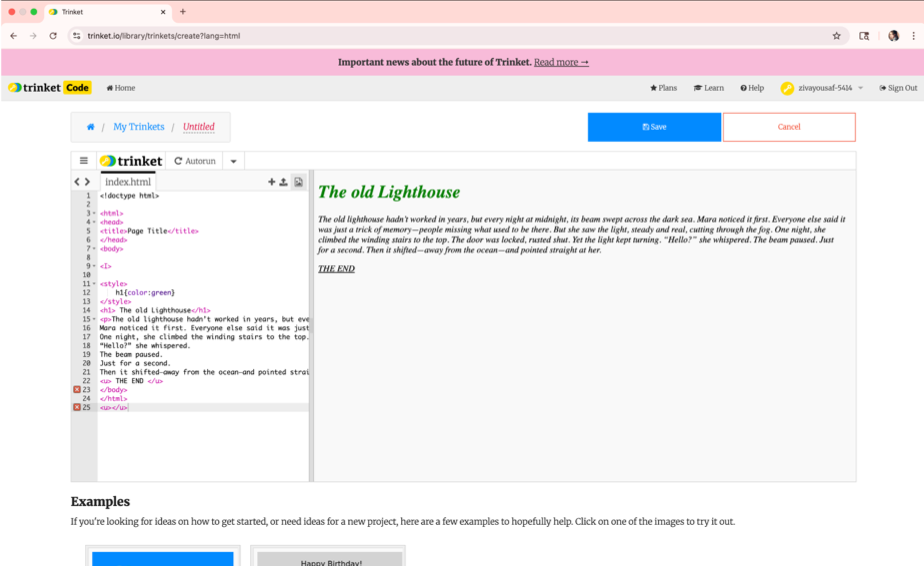
Trinket.io
This is the website I used above!
Next up we have VS code. Vs code is another coding platform, except I personally feel that it’s a lot more advanced and hard to explore for HTML coding beginners. Although it could be better for you, it really depends on the person and how comfortable they are with coding in HTML. I personally like Trinket more because it has more things to explore, saves, easy access and good for begginers. VS code is another coding platform, it doesn't save unless you download the platform, therefore I don't recommend it for people new to HTML. Here’s an idea on how the platform looks! ↓

VSCodes.io
This is the an other coding platform
TIP: Watch videos on HTML basics it helps a lot!
This youtube creator is a very good channel to watch videos for beginners. I watched some of his videos and helped me answer my questions!
URL:
YouTube Channel Name: w3schools
The website that I am listing below is a good website to get the answer to all your questions about HTML and CSS!
Basic CSS
CSS stands for Cascanding Style Sheets. CSS is a stylesheet language used to make web pages more creative or nicer. In other words it's a wardrobe for your HTML web page. Take a look below! You can see on the left hand side the creator did not use CSS and on the right hand side the creator did use CSS. It looks a lot more creative and fun, it’s also most likely it will draw more attention. CSS only works by selecting an HTML element and applying properties to it. While I was practicing css I tried using Internal CSS, so I added the CSS to the HTML file. When you do this, always remember you have this code on your separate CSS file and in your HTML file. Make sure you have a linking code which links your CSS file to your HTML file. For CSS there aren’t tags instead they have a curly brace { for beginning and ending .

Above it's a simple photo on before and after CSS has been applied. On the left is before CSS and on the right of the picture it's after CSS. It's more interesting and bright so it bring the readers eye.
IMPORTANT DEFINITIONS
Internal - Inside the <style> and <head> tags.
External- Separate .css file.
Inline - Single element, applying styles directly to a single HTML element.
Website Building Information
1. Find a Website making platform. (I used Cloudflare, it's of an advanced software platform.)
2. Make sure you have a folder with your pictures that you want to upload and you index.html. (anything you want on your web page make sure you have it in your folder).
3. Get a domain or use a free platform like WordPress, Wix, Squarespace, or Substack.
4. Upload your folder into the platform.
YOUR DONE!Thanks for taking a look at my website. I hope you found some basic information on HTML and CSS. Keep visiting to see any updates on this web page as I will be improving this web page.
< >